

Lifecycle
Lifecycle 이벤트를 사용하면 미리 정의된 시점에서 중요한 이벤트를 가로채어 필요에 따라 서버의 동작을 커스터마이즈할 수 있습니다.
Elysia의 lifecycle은 다음과 같이 표현될 수 있습니다. 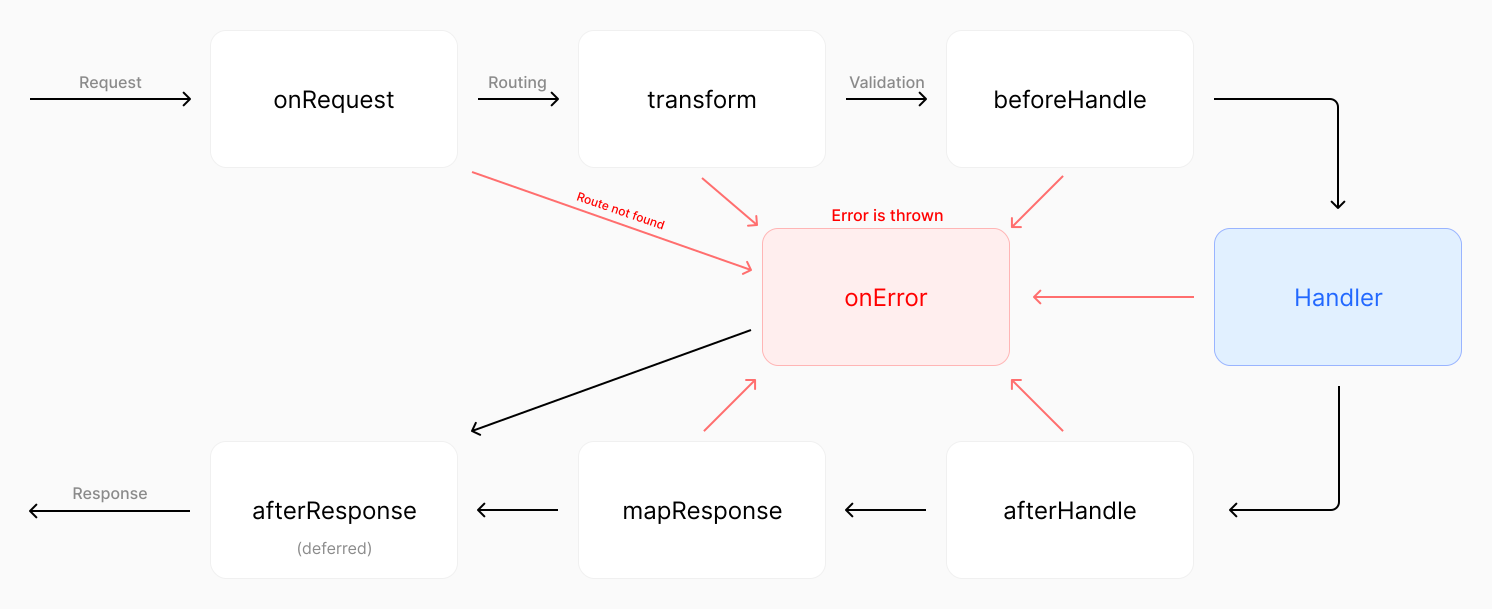
이미지를 클릭하면 확대됩니다
다음은 Elysia에서 사용 가능한 요청 lifecycle 이벤트입니다:
왜 필요한가
HTML을 반환한다고 가정해 봅시다.
일반적으로 브라우저가 렌더링할 수 있도록 "Content-Type" 헤더를 "text/html"로 설정합니다.
하지만 각 라우트마다 수동으로 설정하는 것은 지루합니다.
대신, 프레임워크가 응답이 HTML인지 감지하고 자동으로 헤더를 설정할 수 있다면 어떨까요? 이것이 lifecycle의 아이디어가 나온 이유입니다.
Hook
lifecycle 이벤트를 가로채는 각 함수를 "hook"이라고 합니다.
(함수가 lifecycle 이벤트에 "hooks"하기 때문)
Hook은 2가지 유형으로 분류할 수 있습니다:
- Local Hook: 특정 라우트에서 실행
- Interceptor Hook: 훅이 등록된 이후 모든 라우트에서 실행
TIP
hook은 핸들러와 동일한 Context를 받습니다; 특정 시점에 라우트 핸들러를 추가하는 것으로 상상할 수 있습니다.
Local Hook
local hook은 특정 라우트에서 실행됩니다.
local hook을 사용하려면 라우트 핸들러에 hook을 인라인으로 작성할 수 있습니다:
import { Elysia } from 'elysia'
import { isHtml } from '@elysiajs/html'

new Elysia()
    .get('/', () => '<h1>Hello World</h1>', {
        afterHandle({ responseValue, set }) {
            if (isHtml(responseValue))
                set.headers['Content-Type'] = 'text/html; charset=utf8'
        }
    })
    .get('/hi', () => '<h1>Hello World</h1>')
    .listen(3000)
응답은 다음과 같이 나열되어야 합니다:
| Path | Content-Type |
|---|---|
| / | text/html; charset=utf8 |
| /hi | text/plain; charset=utf8 |
Interceptor Hook
현재 인스턴스의 이후에 오는 모든 핸들러에 hook을 등록합니다.
interceptor hook을 추가하려면 .on 다음에 camelCase로 lifecycle 이벤트를 사용할 수 있습니다:
import { Elysia } from 'elysia'
import { isHtml } from '@elysiajs/html'

new Elysia()
    .get('/none', () => '<h1>Hello World</h1>')
    .onAfterHandle(({ responseValue, set }) => {
        if (isHtml(responseValue))
            set.headers['Content-Type'] = 'text/html; charset=utf8'
    })
    .get('/', () => '<h1>Hello World</h1>')
    .get('/hi', () => '<h1>Hello World</h1>')
    .listen(3000)
응답은 다음과 같이 나열되어야 합니다:
| Path | Content-Type |
|---|---|
| /none | text/plain; charset=utf8 |
| / | text/html; charset=utf8 |
| /hi | text/html; charset=utf8 |
다른 플러그인의 이벤트도 라우트에 적용되므로 코드의 순서가 중요합니다.
코드 순서
이벤트는 등록된 이후 라우트에만 적용됩니다.
플러그인 전에 onError를 넣으면 플러그인은 onError 이벤트를 상속하지 않습니다.
import { Elysia } from 'elysia'

new Elysia()
 	.onBeforeHandle(() => {
        console.log('1')
    })
	.get('/', () => 'hi')
    .onBeforeHandle(() => {
        console.log('2')
    })
    .listen(3000)
콘솔은 다음과 같이 로그해야 합니다:
12가 로그되지 않는 것을 확인하세요. 이벤트가 라우트 이후에 등록되었기 때문에 라우트에 적용되지 않습니다.
이것은 플러그인에도 적용됩니다.
import { Elysia } from 'elysia'

new Elysia()
	.onBeforeHandle(() => {
		console.log('1')
	})
	.use(someRouter)
	.onBeforeHandle(() => {
		console.log('2')
	})
	.listen(3000)
이 예제에서는 플러그인 이후에 이벤트가 등록되었기 때문에 1만 로그됩니다.
모든 이벤트는 onRequest를 제외하고 동일한 규칙을 따릅니다. onRequest는 요청 시 발생하기 때문에 어느 라우트에 적용할지 알 수 없어 전역 이벤트입니다
Request
새 요청이 수신될 때마다 실행되는 첫 번째 lifecycle 이벤트입니다.
onRequest는 오버헤드를 줄이기 위해 가장 중요한 컨텍스트만 제공하도록 설계되었으므로 다음 시나리오에서 사용하는 것이 권장됩니다:
- 캐싱
- Rate Limiter / IP/Region Lock
- 분석
- 커스텀 헤더 제공, 예: CORS
예제
다음은 특정 IP 주소에 대한 rate-limits를 적용하는 의사 코드입니다.
import { Elysia } from 'elysia'

new Elysia()
    .use(rateLimiter)
    .onRequest(({ rateLimiter, ip, set, status }) => {
        if (rateLimiter.check(ip)) return status(420, 'Enhance your calm')
    })
    .get('/', () => 'hi')
.listen(3000)onRequest에서 값이 반환되면 응답으로 사용되고 나머지 lifecycle은 건너뜁니다.
Pre Context
Context의 onRequest는 PreContext로 타입이 지정되며, 다음 속성을 가진 Context의 최소 표현입니다: request: Request
- set:
Set - store
- decorators
Context는 derive가 onTransform 이벤트를 기반으로 하기 때문에 derived 값을 제공하지 않습니다.
Parse
Parse는 Express의 body parser와 동등합니다.
body를 파싱하는 함수로, 반환 값은 Context.body에 추가됩니다. 그렇지 않으면 Elysia는 body가 할당되거나 모든 파서가 실행될 때까지 onParse에 의해 할당된 추가 파서 함수를 계속 반복합니다.
기본적으로 Elysia는 다음의 content-type으로 body를 파싱합니다:
text/plainapplication/jsonmultipart/form-dataapplication/x-www-form-urlencoded
Elysia가 제공하지 않는 커스텀 body parser를 제공하려면 onParse 이벤트를 사용하는 것이 권장됩니다.
예제
다음은 커스텀 헤더를 기반으로 값을 검색하는 예제 코드입니다.
import { Elysia } from 'elysia'

new Elysia().onParse(({ request, contentType }) => {
    if (contentType === 'application/custom-type') return request.text()
})
반환된 값은 Context.body에 할당됩니다. 그렇지 않으면 Elysia는 body가 할당되거나 모든 파서가 실행될 때까지 onParse 스택의 추가 파서 함수를 계속 반복합니다.
Context
onParse Context는 다음 추가 속성과 함께 Context에서 확장됩니다:
- contentType: 요청의 Content-Type 헤더
모든 컨텍스트는 일반 컨텍스트를 기반으로 하며 라우트 핸들러에서 일반 컨텍스트처럼 사용할 수 있습니다.
Parser
기본적으로 Elysia는 body 파싱 함수를 미리 결정하고 프로세스 속도를 높이기 위해 가장 적합한 함수를 선택하려고 시도합니다.
Elysia는 body를 읽어 body 함수를 결정할 수 있습니다.
이 예제를 살펴보세요:
import { Elysia, t } from 'elysia'

new Elysia().post('/', ({ body }) => body, {
    body: t.Object({
        username: t.String(),
        password: t.String()
    })
})
Elysia는 body 스키마를 읽고 타입이 완전히 객체임을 발견했으므로 body가 JSON일 가능성이 높습니다. 그런 다음 Elysia는 미리 JSON body parser 함수를 선택하고 body를 파싱하려고 시도합니다.
다음은 Elysia가 body parser 타입을 선택하는 기준입니다:
application/json: body가t.Object로 타입 지정됨multipart/form-data: body가t.Object로 타입 지정되고t.File이 1 레벨 깊이임application/x-www-form-urlencoded: body가t.URLEncoded로 타입 지정됨text/plain: 기타 원시 타입
이를 통해 Elysia는 미리 body parser를 최적화하고 컴파일 타임에 오버헤드를 줄일 수 있습니다.
Explicit Parser
하지만 일부 시나리오에서 Elysia가 올바른 body parser 함수를 선택하지 못하면 type을 지정하여 Elysia에게 특정 함수를 사용하도록 명시적으로 알릴 수 있습니다.
import { Elysia } from 'elysia'

new Elysia().post('/', ({ body }) => body, {
    // Short form of application/json
    parse: 'json'
})
이를 통해 복잡한 시나리오에서 필요에 맞게 body parser 함수를 선택하는 Elysia 동작을 제어할 수 있습니다.
type은 다음 중 하나일 수 있습니다:
type ContentType = |
    // Shorthand for 'text/plain'
    | 'text'
    // Shorthand for 'application/json'
    | 'json'
    // Shorthand for 'multipart/form-data'
    | 'formdata'
    // Shorthand for 'application/x-www-form-urlencoded'
    | 'urlencoded'
    // Skip body parsing entirely
    | 'none'
    | 'text/plain'
    | 'application/json'
    | 'multipart/form-data'
    | 'application/x-www-form-urlencoded'
Skip Body Parsing
trpc, orpc와 같은 HTTP 핸들러가 있는 타사 라이브러리를 통합해야 하고 Body is already used를 던지는 경우.
이는 Web Standard Request가 한 번만 파싱될 수 있기 때문입니다.
Elysia와 타사 라이브러리 모두 자체 body parser를 가지고 있으므로 parse: 'none'을 지정하여 Elysia 측에서 body 파싱을 건너뛸 수 있습니다.
import { Elysia } from 'elysia'

new Elysia()
	.post(
		'/',
		({ request }) => library.handle(request),
		{
			parse: 'none'
		}
	)
Custom Parser
parser로 커스텀 parser를 등록할 수 있습니다:
import { Elysia } from 'elysia'

new Elysia()
    .parser('custom', ({ request, contentType }) => {
        if (contentType === 'application/elysia') return request.text()
    })
    .post('/', ({ body }) => body, {
        parse: ['custom', 'json']
    })
Transform
Validation 프로세스 직전에 실행되며, 검증에 맞게 컨텍스트를 변형하거나 새 값을 추가하도록 설계되었습니다.
다음을 위해 transform을 사용하는 것이 권장됩니다:
- 검증에 맞게 기존 컨텍스트를 변형합니다.
derive는 타입 제공을 지원하는onTransform을 기반으로 합니다.
예제
다음은 transform을 사용하여 params를 숫자 값으로 변형하는 예제입니다.
import { Elysia, t } from 'elysia'

new Elysia()
    .get('/id/:id', ({ params: { id } }) => id, {
        params: t.Object({
            id: t.Number()
        }),
        transform({ params }) {
            const id = +params.id

            if (!Number.isNaN(id)) params.id = id
        }
    })
    .listen(3000)
Derive
검증 전에 직접 컨텍스트에 새 값을 추가합니다. transform과 동일한 스택에 저장됩니다.
서버가 시작되기 전에 값을 할당하는 state 및 decorate와 달리. derive는 각 요청이 발생할 때 속성을 할당합니다. 이를 통해 정보를 속성으로 추출할 수 있습니다.
import { Elysia } from 'elysia'

new Elysia()
    .derive(({ headers }) => {
        const auth = headers['Authorization']

        return {
            bearer: auth?.startsWith('Bearer ') ? auth.slice(7) : null
        }
    })
.get('/', ({ bearer }) => bearer)derive는 새 요청이 시작될 때 한 번 할당되기 때문에, derive는 store 및 decorate가 할 수 없는 headers, query, body와 같은 Request 속성에 액세스할 수 있습니다.
state 및 decorate와 달리. derive에 의해 할당된 속성은 고유하며 다른 요청과 공유되지 않습니다.
Queue
derive와 transform은 동일한 큐에 저장됩니다.
import { Elysia } from 'elysia'

new Elysia()
    .onTransform(() => {
        console.log(1)
    })
    .derive(() => {
        console.log(2)

        return {}
    })
콘솔은 다음과 같이 로그해야 합니다:
1
2
Before Handle
검증 후 및 메인 라우트 핸들러 전에 실행됩니다.
메인 핸들러를 실행하기 전에 특정 요구 사항을 제공하기 위해 커스텀 검증을 제공하도록 설계되었습니다.
값이 반환되면 라우트 핸들러는 건너뜁니다.
다음 상황에서 Before Handle을 사용하는 것이 권장됩니다:
- 제한된 액세스 확인: 권한 부여, 사용자 로그인
- 데이터 구조에 대한 커스텀 요청 요구 사항
예제
다음은 before handle을 사용하여 사용자 로그인을 확인하는 예제입니다.
import { Elysia } from 'elysia'
import { validateSession } from './user'

new Elysia()
    .get('/', () => 'hi', {
        beforeHandle({ set, cookie: { session }, status }) {
            if (!validateSession(session.value)) return status(401)
        }
    })
    .listen(3000)
응답은 다음과 같이 나열되어야 합니다:
| Is signed in | Response |
|---|---|
| ❌ | Unauthorized |
| ✅ | Hi |
Guard
동일한 before handle을 여러 라우트에 적용해야 할 때 guard를 사용하여 동일한 before handle을 여러 라우트에 적용할 수 있습니다.
import { Elysia } from 'elysia'
import { signUp, signIn, validateSession, isUserExists } from './user'

new Elysia()
    .guard(
        {
            beforeHandle({ set, cookie: { session }, status }) {
                if (!validateSession(session.value)) return status(401)
            }
        },
        (app) =>
            app
                .get('/user/:id', ({ body }) => signUp(body))
                .post('/profile', ({ body }) => signIn(body), {
                    beforeHandle: isUserExists
                })
    )
    .get('/', () => 'hi')
    .listen(3000)
Resolve
검증 후 컨텍스트에 새 값을 추가합니다. beforeHandle과 동일한 스택에 저장됩니다.
Resolve 구문은 derive와 동일합니다. 다음은 Authorization 플러그인에서 bearer 헤더를 검색하는 예제입니다.
import { Elysia, t } from 'elysia'

new Elysia()
    .guard(
        {
            headers: t.Object({
                authorization: t.TemplateLiteral('Bearer ${string}')
            })
        },
        (app) =>
            app
                .resolve(({ headers: { authorization } }) => {
                    return {
                        bearer: authorization.split(' ')[1]
                    }
                })
                .get('/', ({ bearer }) => bearer)
    )
.listen(3000)resolve와 onBeforeHandle을 사용하는 것은 동일한 큐에 저장됩니다.
import { Elysia } from 'elysia'

new Elysia()
    .onBeforeHandle(() => {
        console.log(1)
    })
    .resolve(() => {
        console.log(2)

        return {}
    })
    .onBeforeHandle(() => {
        console.log(3)
    })
콘솔은 다음과 같이 로그해야 합니다:
1
2
3derive와 동일하게, resolve에 의해 할당된 속성은 고유하며 다른 요청과 공유되지 않습니다.
Guard resolve
resolve는 local hook에서 사용할 수 없으므로 guard를 사용하여 resolve 이벤트를 캡슐화하는 것이 권장됩니다.
import { Elysia } from 'elysia'
import { isSignIn, findUserById } from './user'

new Elysia()
    .guard(
        {
            beforeHandle: isSignIn
        },
        (app) =>
            app
                .resolve(({ cookie: { session } }) => ({
                    userId: findUserById(session.value)
                }))
                .get('/profile', ({ userId }) => userId)
    )
    .listen(3000)
After Handle
메인 핸들러 이후에 실행되며, before handle 및 route handler의 반환 값을 적절한 응답으로 매핑합니다.
다음 상황에서 After Handle을 사용하는 것이 권장됩니다:
- 요청을 새 값으로 변환, 예: Compression, Event Stream
- 응답 값을 기반으로 커스텀 헤더 추가, 예: Content-Type
예제
다음은 after handle을 사용하여 응답 헤더에 HTML content type을 추가하는 예제입니다.
import { Elysia } from 'elysia'
import { isHtml } from '@elysiajs/html'

new Elysia()
    .get('/', () => '<h1>Hello World</h1>', {
        afterHandle({ response, set }) {
            if (isHtml(response))
                set.headers['content-type'] = 'text/html; charset=utf8'
        }
    })
    .get('/hi', () => '<h1>Hello World</h1>')
    .listen(3000)
응답은 다음과 같이 나열되어야 합니다:
| Path | Content-Type |
|---|---|
| / | text/html; charset=utf8 |
| /hi | text/plain; charset=utf8 |
Returned Value
After Handle에서 값이 반환되면 값이 undefined가 아닌 한 반환 값을 새 응답 값으로 사용합니다.
위의 예제는 다음과 같이 재작성될 수 있습니다:
import { Elysia } from 'elysia'
import { isHtml } from '@elysiajs/html'

new Elysia()
    .get('/', () => '<h1>Hello World</h1>', {
        afterHandle({ response, set }) {
            if (isHtml(response)) {
                set.headers['content-type'] = 'text/html; charset=utf8'
                return new Response(response)
            }
        }
    })
    .get('/hi', () => '<h1>Hello World</h1>')
.listen(3000)beforeHandle과 달리 afterHandle에서 값이 반환된 후 afterHandle의 반복은 건너뛰지 않습니다.
Context
onAfterHandle context는 클라이언트에 반환할 응답인 response 추가 속성과 함께 Context에서 확장됩니다.
onAfterHandle context는 일반 컨텍스트를 기반으로 하며 라우트 핸들러에서 일반 컨텍스트처럼 사용할 수 있습니다.
Map Response
"afterHandle" 직후에 실행되며, 커스텀 응답 매핑을 제공하도록 설계되었습니다.
다음을 위해 transform을 사용하는 것이 권장됩니다:
- Compression
- 값을 Web Standard Response로 매핑
예제
다음은 mapResponse를 사용하여 Response compression을 제공하는 예제입니다.
import { Elysia } from 'elysia'

const encoder = new TextEncoder()

new Elysia()
    .mapResponse(({ responseValue, set }) => {
        const isJson = typeof response === 'object'

        const text = isJson
            ? JSON.stringify(responseValue)
            : (responseValue?.toString() ?? '')

        set.headers['Content-Encoding'] = 'gzip'

        return new Response(Bun.gzipSync(encoder.encode(text)), {
            headers: {
                'Content-Type': `${
                    isJson ? 'application/json' : 'text/plain'
                }; charset=utf-8`
            }
        })
    })
    .get('/text', () => 'mapResponse')
    .get('/json', () => ({ map: 'response' }))
    .listen(3000)
parse 및 beforeHandle과 마찬가지로, 값이 반환된 후 mapResponse의 다음 반복은 건너뜁니다.
Elysia는 mapResponse에서 set.headers의 병합 프로세스를 자동으로 처리합니다. set.headers를 Response에 수동으로 추가할 필요가 없습니다.
On Error (Error Handling)
오류 처리를 위해 설계되었습니다. lifecycle의 어느 시점에서든 오류가 던져지면 실행됩니다.
다음 상황에서 on Error를 사용하는 것이 권장됩니다:
- 커스텀 오류 메시지 제공
- fail-safe 처리, 오류 핸들러 또는 요청 재시도
- 로깅 및 분석
예제
Elysia는 핸들러에서 던져진 모든 오류를 포착하고, 오류 코드를 분류하여 onError 미들웨어로 파이프합니다.
import { Elysia } from 'elysia'

new Elysia()
    .onError(({ error }) => {
        return new Response(error.toString())
    })
    .get('/', () => {
        throw new Error('Server is during maintenance')

        return 'unreachable'
})onError를 사용하면 오류를 포착하고 커스텀 오류 메시지로 변환할 수 있습니다.
TIP
적용하려는 핸들러 전에 onError를 호출하는 것이 중요합니다.
Custom 404 message
예를 들어, 커스텀 404 메시지 반환:
import { Elysia, NotFoundError } from 'elysia'

new Elysia()
    .onError(({ code, status, set }) => {
        if (code === 'NOT_FOUND') return status(404, 'Not Found :(')
    })
    .post('/', () => {
        throw new NotFoundError()
    })
    .listen(3000)
Context
onError Context는 다음 추가 속성과 함께 Context에서 확장됩니다:
- error: 던져진 값
- code: Error Code
Error Code
Elysia 오류 코드는 다음으로 구성됩니다:
- NOT_FOUND
- PARSE
- VALIDATION
- INTERNAL_SERVER_ERROR
- INVALID_COOKIE_SIGNATURE
- INVALID_FILE_TYPE
- UNKNOWN
- number (HTTP Status 기반)
기본적으로 던져진 오류 코드는 UNKNOWN입니다.
TIP
오류 응답이 반환되지 않으면 error.name을 사용하여 오류가 반환됩니다.
Local Error
다른 life-cycle과 동일하게, scope에 guard를 사용하여 오류를 제공할 수 있습니다:
import { Elysia } from 'elysia'

new Elysia()
    .get('/', () => 'Hello', {
        beforeHandle({ set, request: { headers }, error }) {
            if (!isSignIn(headers)) throw error(401)
        },
        error() {
            return 'Handled'
        }
    })
    .listen(3000)
After Response
클라이언트에 응답이 전송된 후 실행됩니다.
다음 상황에서 After Response를 사용하는 것이 권장됩니다:
- 응답 정리
- 로깅 및 분석
예제
다음은 response handle을 사용하여 사용자 로그인을 확인하는 예제입니다.
import { Elysia } from 'elysia'

new Elysia()
    .onAfterResponse(() => {
        console.log('Response', performance.now())
    })
    .listen(3000)
콘솔은 다음과 같이 로그해야 합니다:
Response 0.0000
Response 0.0001
Response 0.0002
Response
Map Response와 유사하게 afterResponse도 responseValue 값을 받습니다.
import { Elysia } from 'elysia'

new Elysia()
	.onAfterResponse(({ responseValue }) => {
		console.log(responseValue)
	})
	.get('/', () => 'Hello')
.listen(3000)onAfterResponse의 response는 Web-Standard의 Response가 아니라 핸들러에서 반환된 값입니다.
핸들러에서 반환된 headers와 status를 가져오려면 컨텍스트에서 set에 액세스할 수 있습니다.
import { Elysia } from 'elysia'

new Elysia()
	.onAfterResponse(({ set }) => {
		console.log(set.status, set.headers)
	})
	.get('/', () => 'Hello')
	.listen(3000)