

OpenTelemetry
OpenTelemetry를 사용하려면 @elysiajs/opentelemetry를 설치하고 인스턴스에 플러그인을 적용하세요.
import { Elysia } from 'elysia'
import { opentelemetry } from '@elysiajs/opentelemetry'

import { BatchSpanProcessor } from '@opentelemetry/sdk-trace-node'
import { OTLPTraceExporter } from '@opentelemetry/exporter-trace-otlp-proto'

new Elysia().use(
	opentelemetry({
		spanProcessors: [new BatchSpanProcessor(new OTLPTraceExporter())]
	})
)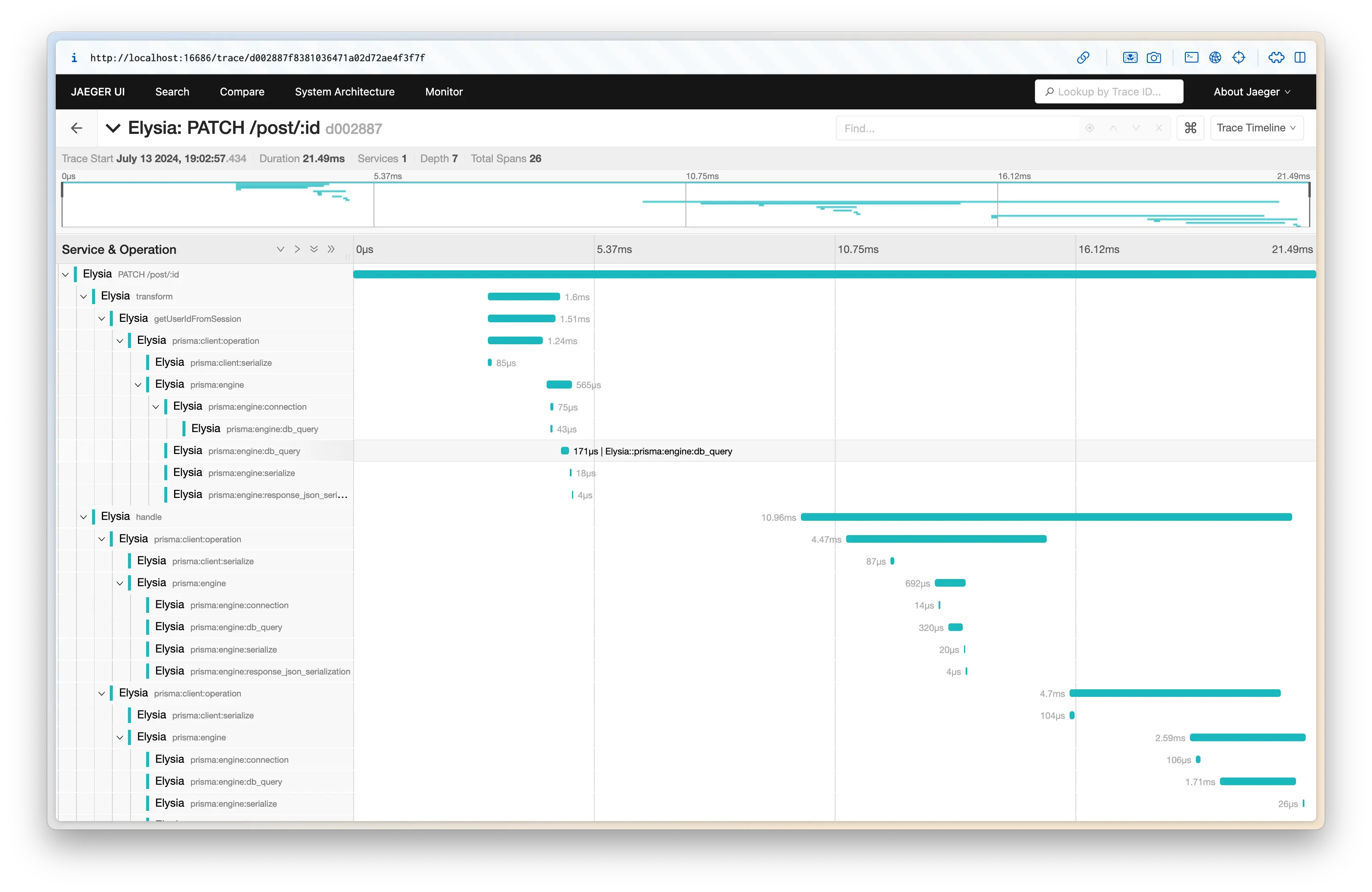
Elysia OpenTelemetry는 OpenTelemetry 표준과 호환되는 모든 라이브러리의 span을 수집하며, 부모 및 자식 span을 자동으로 적용합니다.
위 코드에서는 각 쿼리가 얼마나 걸렸는지 추적하기 위해 Prisma를 적용했습니다.
OpenTelemetry를 적용하면 Elysia는 다음을 수행합니다:
- 텔레메트리 데이터 수집
- 관련 라이프사이클을 함께 그룹화
- 각 함수가 소요된 시간 측정
- HTTP 요청 및 응답 계측
- 오류 및 예외 수집
텔레메트리 데이터를 Jaeger, Zipkin, New Relic, Axiom 또는 기타 OpenTelemetry 호환 백엔드로 내보낼 수 있습니다.
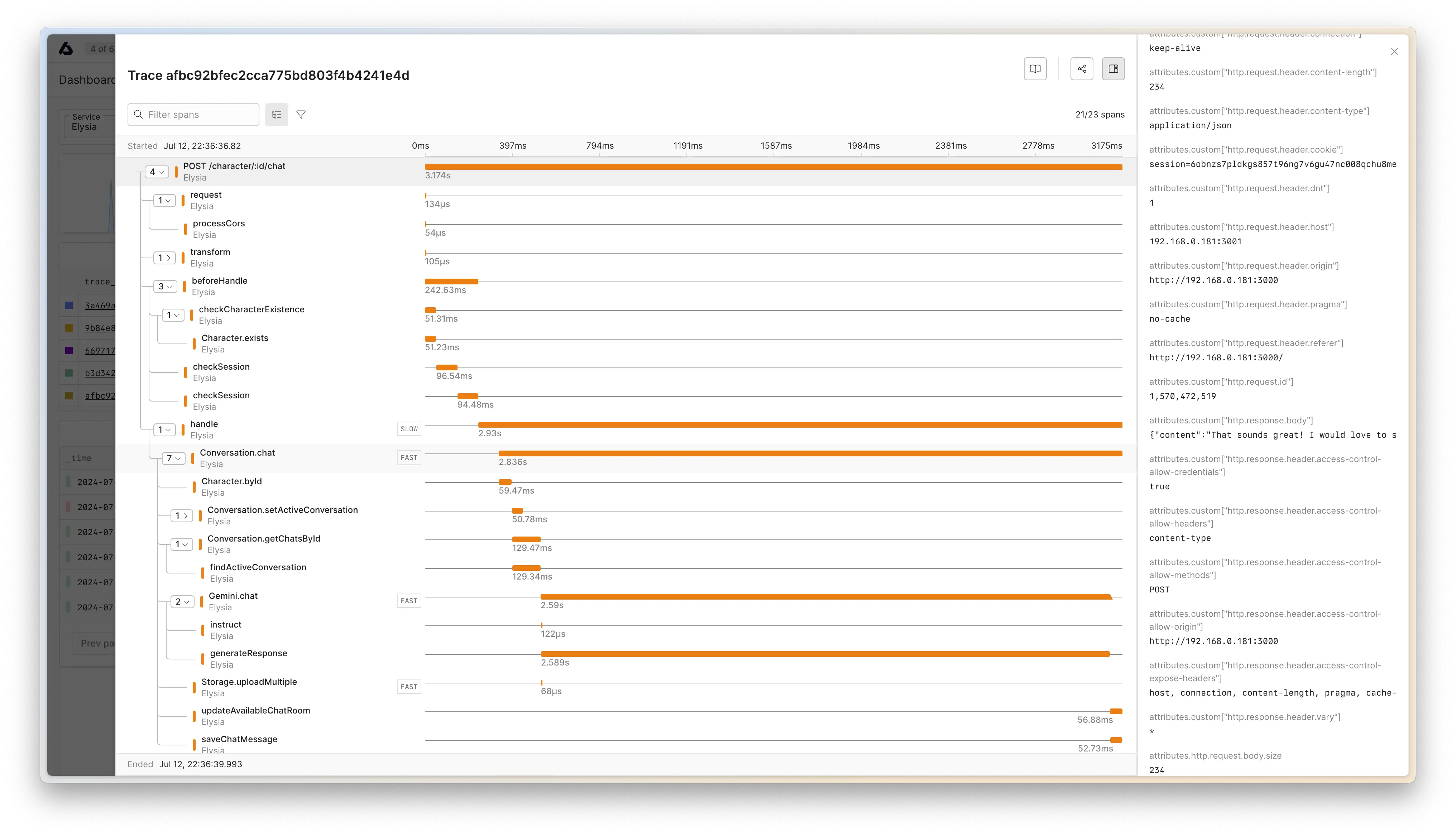
다음은 Axiom으로 텔레메트리를 내보내는 예시입니다:
import { Elysia } from 'elysia'
import { opentelemetry } from '@elysiajs/opentelemetry'

import { BatchSpanProcessor } from '@opentelemetry/sdk-trace-node'
import { OTLPTraceExporter } from '@opentelemetry/exporter-trace-otlp-proto'

new Elysia().use(
	opentelemetry({
		spanProcessors: [
			new BatchSpanProcessor(
				new OTLPTraceExporter({
					url: 'https://api.axiom.co/v1/traces',
					headers: {
						Authorization: `Bearer ${Bun.env.AXIOM_TOKEN}`,
						'X-Axiom-Dataset': Bun.env.AXIOM_DATASET
					}
				})
			)
		]
	})
)
Instrumentations
많은 계측 라이브러리는 SDK가 모듈을 가져오기 전에 실행되어야 합니다.
예를 들어, PgInstrumentation을 사용하려면 pg 모듈을 가져오기 전에 OpenTelemetry SDK가 실행되어야 합니다.
Bun에서 이를 달성하려면:
- OpenTelemetry 설정을 별도의 파일로 분리
- OpenTelemetry 설정 파일을 미리 로드하기 위한
bunfig.toml생성
src/instrumentation.ts에 새 파일을 생성해봅시다:
import { opentelemetry } from '@elysiajs/opentelemetry'
import { PgInstrumentation } from '@opentelemetry/instrumentation-pg'

export const instrumentation = opentelemetry({
	instrumentations: [new PgInstrumentation()]
})
그런 다음 src/index.ts의 메인 인스턴스에 이 instrumentation 플러그인을 적용할 수 있습니다:
import { Elysia } from 'elysia'
import { instrumentation } from './instrumentation.ts'

new Elysia().use(instrumentation).listen(3000)
그런 다음 다음과 같이 bunfig.toml을 생성합니다:
preload = ["./src/instrumentation.ts"]이것은 Bun에게 src/index.ts를 실행하기 전에 instrumentation을 로드하고 설정하도록 지시하여 OpenTelemetry가 필요한 설정을 수행할 수 있도록 합니다.
프로덕션에 배포
bun build 또는 다른 번들러를 사용하는 경우:
OpenTelemetry는 node_modules/<library>에 대한 몽키 패치에 의존하므로, 계측이 제대로 작동하려면 계측할 라이브러리를 외부 모듈로 지정하여 번들에서 제외해야 합니다.
예를 들어, pg 라이브러리를 계측하기 위해 @opentelemetry/instrumentation-pg를 사용하는 경우, pg를 번들에서 제외하고 node_modules/pg에서 가져오도록 해야 합니다.
이를 위해 --external pg로 pg를 외부 모듈로 지정할 수 있습니다:
bun build --compile --external pg --outfile server src/index.ts이것은 Bun에게 pg를 최종 출력 파일에 번들하지 말고 런타임에 node_modules 디렉토리에서 가져오도록 지시합니다. 따라서 프로덕션 서버에서도 node_modules 디렉토리를 유지해야 합니다.
프로덕션 서버에서 사용 가능해야 하는 패키지를 package.json의 dependencies로 지정하고 bun install --production을 사용하여 프로덕션 종속성만 설치하는 것이 권장됩니다.
{
	"dependencies": {
		"pg": "^8.15.6"
	},
	"devDependencies": {
		"@elysiajs/opentelemetry": "^1.2.0",
		"@opentelemetry/instrumentation-pg": "^0.52.0",
		"@types/pg": "^8.11.14",
		"elysia": "^1.2.25"
	}
}
그런 다음 빌드 명령을 실행한 후 프로덕션 서버에서:
bun install --productionnode_modules 디렉토리에 여전히 개발 종속성이 포함되어 있는 경우, node_modules 디렉토리를 제거하고 프로덕션 종속성을 다시 설치할 수 있습니다.
OpenTelemetry SDK
Elysia OpenTelemetry는 Elysia 서버에만 OpenTelemetry를 적용하기 위한 것입니다.
OpenTelemetry SDK를 정상적으로 사용할 수 있으며, span이 Elysia의 요청 span 아래에서 실행되면 자동으로 Elysia 추적에 나타납니다.
그러나 애플리케이션의 모든 부분에서 span을 수집하기 위한 getTracer 및 record 유틸리티도 제공합니다.
import { Elysia } from 'elysia'
import { record } from '@elysiajs/opentelemetry'

export const plugin = new Elysia().get('', () => {
	return record('database.query', () => {
		return db.query('SELECT * FROM users')
	})
})
Record 유틸리티
record는 OpenTelemetry의 startActiveSpan과 동등하지만 자동 종료 및 예외 캡처를 자동으로 처리합니다.
record를 추적에 표시될 코드의 레이블로 생각할 수 있습니다.
관찰성을 위한 코드베이스 준비
Elysia OpenTelemetry는 라이프사이클을 그룹화하고 각 훅의 함수 이름을 span의 이름으로 읽습니다.
이제 함수에 이름을 지정하기 좋은 시기입니다.
훅 핸들러가 화살표 함수인 경우, 추적을 더 잘 이해하기 위해 명명된 함수로 리팩토링할 수 있습니다. 그렇지 않으면 추적 span의 이름이 anonymous가 됩니다.
const bad = new Elysia()
	// ⚠️ span name will be anonymous
	.derive(async ({ cookie: { session } }) => {
		return {
			user: await getProfile(session)
		}
	})

const good = new Elysia()
	// ✅ span name will be getProfile
	.derive(async function getProfile({ cookie: { session } }) {
		return {
			user: await getProfile(session)
		}
	})
getCurrentSpan
getCurrentSpan은 핸들러 외부에서 현재 요청의 현재 span을 가져오는 유틸리티입니다.
import { getCurrentSpan } from '@elysiajs/opentelemetry'

function utility() {
	const span = getCurrentSpan()
	span.setAttributes({
		'custom.attribute': 'value'
	})
}
이것은 AsyncLocalStorage에서 현재 span을 검색하여 핸들러 외부에서 작동합니다.
setAttributes
setAttributes는 현재 span에 속성을 설정하는 유틸리티입니다.
import { setAttributes } from '@elysiajs/opentelemetry'

function utility() {
	setAttributes({
		'custom.attribute': 'value'
	})
}
이것은 getCurrentSpan().setAttributes에 대한 구문 설탕입니다.
구성
구성 옵션 및 정의는 opentelemetry plugin을 참조하세요.