
React Email
React Email은 React 컴포넌트를 사용하여 이메일을 생성할 수 있게 해주는 라이브러리입니다.
Elysia는 Bun을 런타임 환경으로 사용하므로, React Email 컴포넌트를 직접 작성하고 JSX를 코드에 직접 가져와서 이메일을 보낼 수 있습니다.
설치
React Email을 설치하려면 다음 명령을 실행하세요:
bun add -d react-email
bun add @react-email/components react react-dom
그런 다음 package.json에 다음 스크립트를 추가하세요:
{
  "scripts": {
    "email": "email dev --dir src/emails"
  }
}
src/emails 디렉토리에 이메일 템플릿을 추가하는 것을 권장합니다. JSX 파일을 직접 가져올 수 있기 때문입니다.
TypeScript
TypeScript를 사용하는 경우 tsconfig.json에 다음을 추가해야 할 수 있습니다:
{
  "compilerOptions": {
	"jsx": "react"
  }
}
첫 번째 이메일
다음 코드로 src/emails/otp.tsx 파일을 생성하세요:
import * as React from 'react'
import { Tailwind, Section, Text } from '@react-email/components'

export default function OTPEmail({ otp }: { otp: number }) {
    return (
        <Tailwind>
            <Section className="flex justify-center items-center w-full min-h-screen font-sans">
                <Section className="flex flex-col items-center w-76 rounded-2xl px-6 py-1 bg-gray-50">
                    <Text className="text-xs font-medium text-violet-500">
                        Verify your Email Address
                    </Text>
                    <Text className="text-gray-500 my-0">
                        Use the following code to verify your email address
                    </Text>
                    <Text className="text-5xl font-bold pt-2">{otp}</Text>
                    <Text className="text-gray-400 font-light text-xs pb-4">
                        This code is valid for 10 minutes
                    </Text>
                    <Text className="text-gray-600 text-xs">
                        Thank you for joining us
                    </Text>
                </Section>
            </Section>
        </Tailwind>
    )
}

OTPEmail.PreviewProps = {
    otp: 123456
}@react-email/components를 사용하여 이메일 템플릿을 생성하고 있음을 알 수 있습니다.
이 라이브러리는 Gmail, Outlook 등의 이메일 클라이언트와 호환되는 Tailwind로 스타일링을 포함한 컴포넌트 세트를 제공합니다.
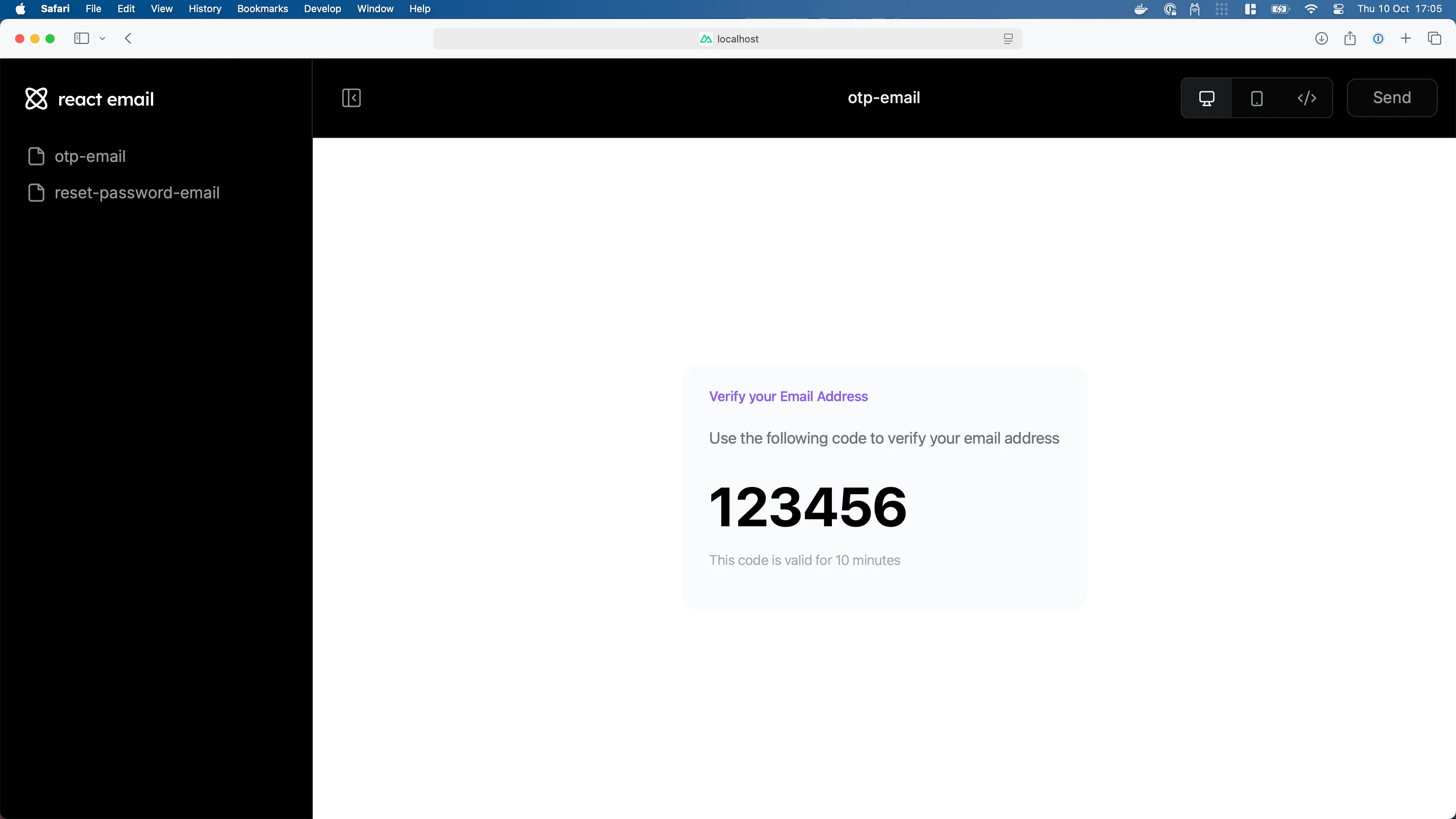
또한 OTPEmail 함수에 PreviewProps를 추가했습니다. 이는 플레이그라운드에서 이메일을 미리 볼 때만 적용됩니다.
이메일 미리보기
이메일을 미리 보려면 다음 명령을 실행하세요:
bun email이것은 이메일 미리보기와 함께 브라우저 창을 엽니다.
이메일 보내기
이메일을 보내려면 react-dom/server를 사용하여 이메일을 렌더링한 다음 선호하는 제공업체를 사용하여 제출할 수 있습니다:
import { Elysia, t } from 'elysia'

import * as React from 'react'
import { renderToStaticMarkup } from 'react-dom/server'

import OTPEmail from './emails/otp'

import nodemailer from 'nodemailer'

const transporter = nodemailer.createTransport({
  	host: 'smtp.gehenna.sh',
  	port: 465,
  	auth: {
  		user: 'makoto',
  		pass: '12345678'
  	}
})

new Elysia()
	.get('/otp', async ({ body }) => {
		// Random between 100,000 and 999,999
  		const otp = ~~(Math.random() * (900_000 - 1)) + 100_000

		const html = renderToStaticMarkup(<OTPEmail otp={otp} />)

        await transporter.sendMail({
        	from: 'ibuki@gehenna.sh',
           	to: body,
           	subject: 'Verify your email address',
            html,
        })

        return { success: true }
	}, {
		body: t.String({ format: 'email' })
	})
.listen(3000)import { Elysia, t } from 'elysia'
import OTPEmail from './emails/otp'
import Resend from 'resend'
const resend = new Resend('re_123456789')
new Elysia()
.get('/otp', ({ body }) => {
// Random between 100,000 and 999,999
const otp = ~~(Math.random() * (900_000 - 1)) + 100_000
await resend.emails.send({
from: 'ibuki@gehenna.sh',
to: body,
subject: 'Verify your email address',
html: <OTPEmail otp={otp} />,
})
return { success: true }
}, {
body: t.String({ format: 'email' })
})
.listen(3000)import { Elysia, t } from 'elysia'
import * as React from 'react'
import { renderToStaticMarkup } from 'react-dom/server'
import OTPEmail from './emails/otp'
import { type SendEmailCommandInput, SES } from '@aws-sdk/client-ses'
import { fromEnv } from '@aws-sdk/credential-providers'
const ses = new SES({
credentials:
process.env.NODE_ENV === 'production' ? fromEnv() : undefined
})
new Elysia()
.get('/otp', ({ body }) => {
// Random between 100,000 and 999,999
const otp = ~~(Math.random() * (900_000 - 1)) + 100_000
const html = renderToStaticMarkup(<OTPEmail otp={otp} />)
await ses.sendEmail({
Source: 'ibuki@gehenna.sh',
Destination: {
ToAddresses: [body]
},
Message: {
Body: {
Html: {
Charset: 'UTF-8',
Data: html
}
},
Subject: {
Charset: 'UTF-8',
Data: 'Verify your email address'
}
}
} satisfies SendEmailCommandInput)
return { success: true }
}, {
body: t.String({ format: 'email' })
})
.listen(3000)import { Elysia, t } from 'elysia'
import OTPEmail from './emails/otp'
import sendgrid from "@sendgrid/mail"
sendgrid.setApiKey(process.env.SENDGRID_API_KEY)
new Elysia()
.get('/otp', ({ body }) => {
// Random between 100,000 and 999,999
const otp = ~~(Math.random() * (900_000 - 1)) + 100_000
const html = renderToStaticMarkup(<OTPEmail otp={otp} />)
await sendgrid.send({
from: 'ibuki@gehenna.sh',
to: body,
subject: 'Verify your email address',
html
})
return { success: true }
}, {
body: t.String({ format: 'email' })
})
.listen(3000)TIP
Bun 덕분에 이메일 컴포넌트를 바로 가져올 수 있습니다
React Email과의 사용 가능한 모든 통합은 React Email Integration에서 확인할 수 있으며, React Email에 대한 자세한 내용은 React Email 문서에서 확인할 수 있습니다.